![risika__logo_grøn-2.png]](https://help.risika.dk/hs-fs/hubfs/risika__logo_gr%C3%B8n-2.png?height=40&name=risika__logo_gr%C3%B8n-2.png)
Step-by-step guide
Going forward, you will find that information on beneficial owners is locked by default. You will encounter this throughout the Risika platform in the areas where you usually find this data.
To unlock the information, simply follow these four short steps:
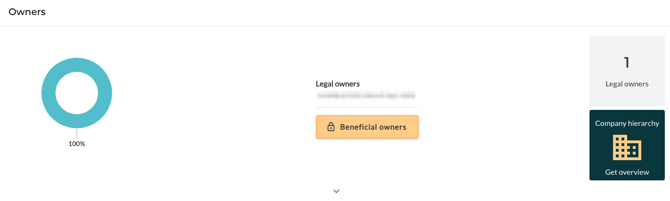
1. Click the lock icon: Press the yellow button featuring the lock icon and the text 'Beneficial owners'.

2. Provide a legitimate reason: In the new window, you must select a legitimate reason for why you are requesting this information.
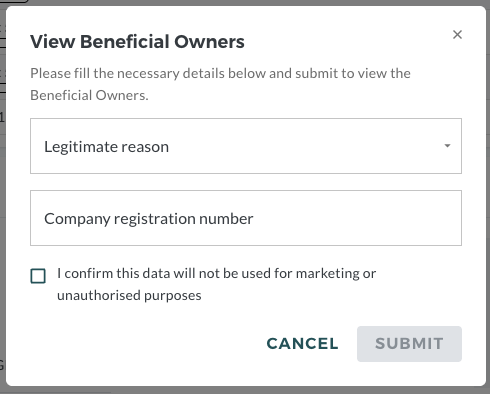
Your options are:
-
Customer Due Diligence (CDD)
-
Sanctions screening
-
Credit risk assessment
3. Enter CVR number: Provide the CVR number (VAT/Registration number) of the specific company you are requesting the information on behalf of (the company your user account is associated with).
4. Confirm your purpose: Finally, check the box next to "I confirm that this data will not be used for marketing or unauthorized purposes."
Once you have submitted your details, the data will be unlocked, and the information regarding the company's beneficial owners will be displayed exactly as you are used to.
The Beneficial Owners field under the credit check will look like this before and after unlocking.
Before unlocking beneficial owners:
After unlocking beneficial owners:
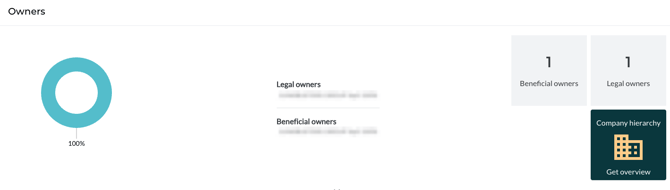 The images a blurred to not share any sensitive information.
If you have more questions, or want to read more about the upcoming change, then you can read more about it here: Ultimate Beneficial Owners: A Guide to the New Access Requirements
And don't hesitate to reach out to us if you have any questions!